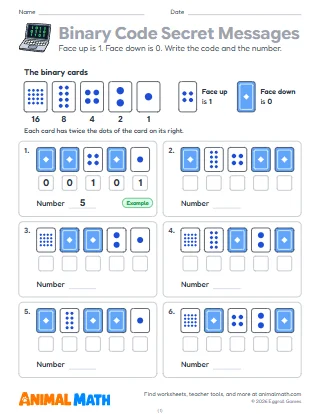
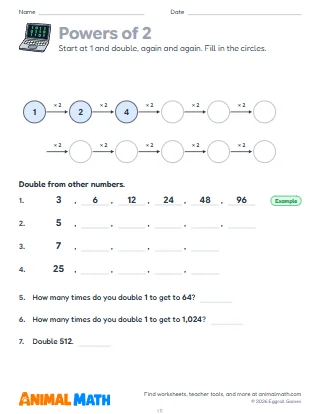
Everything a computer stores is made of bits. A bit is a single 0 or 1, like a light switch that is off or on. One bit can only say two things, but each bit you add doubles the number of codes: 2 bits make 4 codes, 3 bits make 8, and 8 bits, called a byte, make 256, enough for every number from 0 to 255. Computers often store each letter as one byte, using a code called ASCII, where the capital letter A is 65, or 01000001. Pictures are bits too: in the simplest black-and-white picture, each 1 is a dark square and each 0 a white one. A kilobyte is about 1,000 bytes.
Seven pages about how computers store things. Page 1 shows bits as light bulbs (on is 1, off is 0) and asks for every code that 2 and 3 bits can make. Page 2 fills in a table of how many codes 1 to 8 bits make, doubling each time, and works with bytes: 256 codes, the biggest number 255, and bits and bytes changed with 8 bits a byte. Page 3 turns bytes into numbers and numbers into bytes, with the place values 128, 64, 32, 16, 8, 4, 2 and 1. On page 4 each row of a picture is a byte: students color a square for each 1 to see four pictures. Page 5 goes the other way: write the bytes for two pictures, then draw a picture and write its bytes. Page 6 decodes and encodes words with the letter codes computers often use, A = 65 to Z = 90. Page 7 is six stories about bits and bytes in real life. The first problem on each page is worked as an example.
Line up eight students as a byte, each holding a card worth 128, 64, 32, 16, 8, 4, 2 or 1, and let them stand for 1 and sit for 0 as the class calls out numbers. Before page 4, show a picture on graph paper zoomed in until the squares show: screens are made of tiny squares too. On page 6, ask why a computer needs a different code for a capital A (65) and a small a (97).
Draw an 8 by 8 grid and make a picture for someone else to find from its bytes alone. Then write a short message in the letter codes on page 6 and see if they can decode it.
How computers store numbers, pictures and letters: a bit is one 0 or 1, and 8 bits make a byte. Students find how many codes each extra bit makes, turn bytes into numbers and back, color pictures from rows of bits, write the bytes for pictures, decode and encode letters and solve stories about bits, bytes and kilobytes.
Tell us what to make next, or build your own with a worksheet maker.
This worksheet is free to download, print, copy, and hand out in your classroom or at home. You do not need to create an account, and there are no watermarks on the PDF.